MissionBI Connect for
Blackbaud Raiser's Edge NXT

Deliver the complete scope of your RE NXT data directly into Power BI, Tableau, Crystal Reports, or any reporting software — fully managed, automatically refreshed, and always current. No technical staff required.

Blackbaud Marketplace
Official
Partner Application
Go-Live Timeline
1–3 Weeks
From contract to delivery
All Fields
Guaranteed
Missing fields added free

Everything in Your RE NXT Database, Organized and Ready for Reporting

MissionBI Connect™ for Raiser's Edge NXT delivers your complete RE NXT data in an elegantly organized format, making it simple to locate every record and field you need.

📡

Complete RE NXT Data Access

Every field for every RE NXT record type is available — constituents, gifts, actions, events, memberships, opportunities, and more.

High-Performance, Low-Latency Framework

Filter and query your data with quick responsiveness during report development, and the same speed carries over to distributed reports.

🔒

Enterprise-Grade Security on Microsoft Azure

Hosted on the same secure Microsoft Azure Cloud Platform that Blackbaud selected for NXT. Azure provides 256-bit AES encryption at rest, TLS encryption in transit, role-based access controls, and continuous threat detection through Microsoft Defender for Cloud.

🔧

100% Managed — Zero Burden on Your Team

Entirely hosted and managed by MissionBI. Zero maintenance, zero upkeep, zero specialized knowledge required from your staff — ever.

🎯

Purpose-Built for Custom Reporting

Data is organized into intuitive Field Groups aligned with RE NXT record types — immediately navigable for both experienced developers and newcomers.

✓ All Fields Guaranteed

Every field you need for all RE NXT record types is included. If you ever can’t locate a field needed for a report, we’ll add it at no additional charge.

Compatible Reporting Tools

Works with any reporting software that can connect to a data source:

Power BITableauCrystal ReportsQlik& Any Other Tool

Direct Database Access Available

For technical users, the underlying Azure SQL database can be accessed directly via SQL Server Management Studio, Azure Data Studio, and similar tools.

Your RE NXT Data, Organized Into Intuitive Field Groups

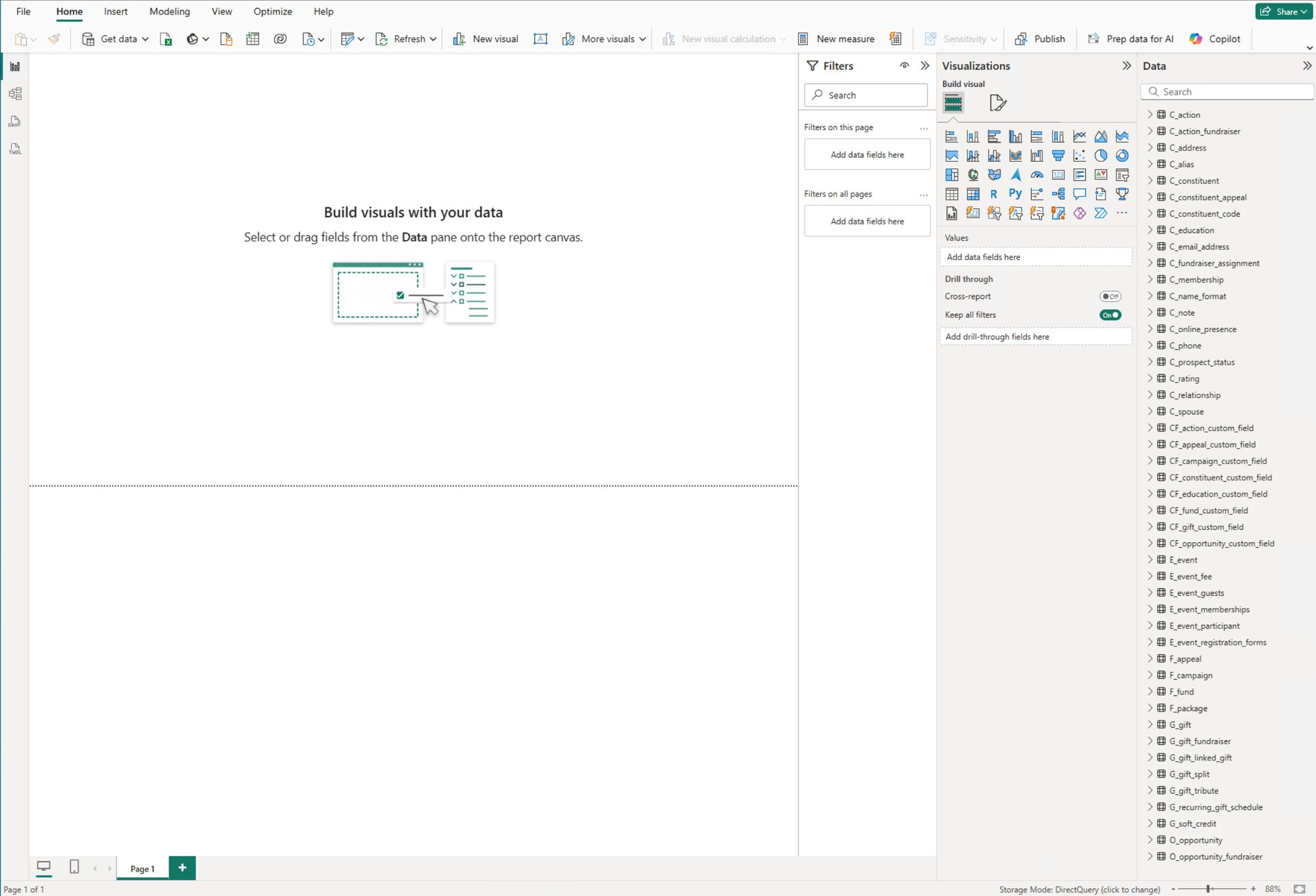
Your RE NXT data is organized into Field Groups — each containing all fields for a specific record type, expandable within your reporting tool’s data panel.

All RE NXT Field Groups are available in every connected reporting tool. The screenshot below shows how they appear in Power BI Desktop. Click to expand for full detail.

MissionBI Connect™ — RE NXT Field Groups as displayed within Power BI Desktop:

Not all field groups are visible in the Power BI image below — the complete list of field groups is shown in full below.

MissionBI Connect RE NXT Field Groups in Power BI Desktop
🔍 Click to expand full view
Constituent Field Groups
C_actionC_action_fundraiserC_addressC_aliasC_constituentC_constituent_appealC_constituent_codeC_educationC_email_addressC_fundraiser_assignmentC_membershipC_name_formatC_noteC_online_presenceC_phoneC_prospect_statusC_ratingC_relationshipC_spouse
Gift Field Groups
G_giftG_gift_fundraiserG_gift_linked_giftG_gift_splitG_gift_tributeG_recurring_gift_scheduleG_soft_credit
Custom Field Groups
CF_action_custom_fieldCF_appeal_custom_fieldCF_campaign_custom_fieldCF_constituent_custom_fieldCF_education_custom_fieldCF_fund_custom_fieldCF_gift_custom_fieldCF_opportunity_custom_field
Event Field Groups
E_eventE_event_feeE_event_guestsE_event_membershipsE_event_participantE_event_registration_forms
Fundraising Field Groups
F_appealF_campaignF_fundF_package
Opportunity Field Groups
O_opportunityO_opportunity_fundraiser

Distribute Always-Current Reports to Staff, Administrators & Board Members

MissionBI Connect doesn’t just power your report development environment — it serves as the ongoing live data source for every report and dashboard you distribute to your organization. When a board member, administrator, or staff member opens a shared report, it automatically reflects your most current RE NXT data.

Using report distribution tools such as the Power BI Service and Tableau Online, you can publish and distribute custom reports and dashboards across your entire organization. Every user sees fresh, accurate data — without anyone manually refreshing exports or sending updated spreadsheets.

Power BI Report Distribution

For most organizations, Power BI reports and dashboards are distributed to staff, administrators, and board members through Power BI Service Workspace Apps, Microsoft Teams, or SharePoint. Because MissionBI Connect runs within the native Microsoft Azure environment, it connects seamlessly with all of these platforms — no additional configuration required.

Power BI ServiceTableau OnlinePower BI DesktopCrystal ReportsQlik

What This Means for Your Organization

No more emailing spreadsheet attachments. No more “please refresh before the board meeting.” Just live, trusted data — wherever your team needs it.

Board members open dashboards that always reflect your most recent RE NXT data
Gift officers see current portfolio metrics the moment they log in
Development staff run campaign analysis on current data, not last month’s export
Finance and leadership view real-time fund performance across the organization
Zero data manipulation, zero manual refresh, zero spreadsheet management
Currently using Blackbaud’s Database Backup Service? Switching to MissionBI Connect returns all the time spent managing that solution and delivers a fully automated, hands-free experience.

Two Situations Where MissionBI Connect Delivers Immediate Value

01

Migrating from On-Premise RE7 to RE NXT — But Holding Back Because of Your Custom Reports?

If you’ve been delaying the move from on-premise RE7 to cloud-hosted NXT because your custom reports won’t survive the migration, MissionBI Connect solves that completely. All of your custom reports stay 100% connected to your RE NXT data after migration, with full support to re-map reports to the NXT data structure.

02

Currently Using Blackbaud’s Database Backup Service to Power Custom Reporting?

Switching to MissionBI Connect delivers a dramatically better experience — continuous automated data refresh, a fully managed hands-free solution, and zero maintenance burden on your team.

MissionBI Connect vs. the Blackbaud Power BI Connector

Blackbaud offers a free, open-source Power BI connector — but organizations that have tried it know the reality: a complex, IT-dependent setup, significant ongoing maintenance, and real limitations on the data you can access. Here’s how the two approaches compare across every dimension that matters.

What Matters MissionBI Connect™
Fully Managed Service
Blackbaud Power BI Connector
Open-Source / Self-Managed
Setup & Ease of Use
What does getting started look like?
We handle everything. Your team connects your reporting tool using a standard database connection — no coding, no developer account, no application registration. Typical go-live: 1–3 weeks from contract signature.
Requires a Blackbaud SKY Developer account, registering a custom application, obtaining API credentials, downloading and compiling source code, manually creating a .mez file, and placing it in a specific Windows directory. Community members describe this as “a bit of a chore” even for technical users.
IT Staff Requirements
Who needs to be involved?
Zero IT involvement required. MissionBI manages all infrastructure, credentials, and maintenance. No servers to configure, no software to install, no IT administrator needed at any point.
Scheduled refresh via Power BI Service requires an IT administrator to install and configure a Power BI On-Premises Data Gateway in Standard mode — a dedicated Windows machine that must remain running, maintained, and managed by your IT team indefinitely.
Scope of Data Available
How much of your RE NXT data can you access?
Every field for every RE NXT record type — guaranteed. Constituents, gifts, campaigns, funds, appeals, relationships, actions, opportunities, tributes, custom fields, and more. If you ever can’t locate a field needed for a report, we add it at no additional charge.
Limited to the specific SKY API list endpoints the connector supports. Community users consistently report that data available via RE NXT Query is not accessible through the connector. Custom field categories, Fund custom fields, and other record types are known gaps — requiring complex workarounds through Power Automate.
Record Volume & Performance
Can it handle large datasets?
Purpose-built for reporting with a high-performance, low-latency data architecture. Your complete dataset — regardless of volume — is pre-loaded and optimized for fast queries. Reports load quickly and filters respond instantly, even across millions of records.
The connector pulls data through the SKY API in batches of 5,000 records at a time. For organizations with large gift histories, this results in hundreds of sequential API calls per refresh — causing slow refresh times and frequent timeout errors. Organizations with large record volumes report the connector becomes impractical.
Keeping Reports Current
How does scheduled refresh work?
Fully automated, cloud-based refresh on your chosen schedule — nightly, weekly, or up to every 15 minutes. Nothing to configure, maintain, or monitor. Your reports are simply current when your team arrives. No gateway, no server, no manual steps.
Scheduled refresh requires a permanently running On-Premises Data Gateway. Community users report frequent refresh failures due to authentication token expiry, gateway machine path issues, and SKY API connectivity errors — often with cryptic error messages and no clear resolution path.
Ongoing Maintenance
What happens when things change?
Zero maintenance burden on your team. MissionBI handles all platform updates, API changes, credential renewals, and infrastructure maintenance. When Blackbaud updates their API, we update our service — transparently and automatically.
Your team owns all maintenance: updating the .mez connector file on every machine, re-authorizing OAuth credentials when they expire, managing gateway service account permissions, and troubleshooting failures. Moving the gateway to a new machine is a commonly reported source of major breakage.
Security & Compliance
How is your data protected?
Hosted on Microsoft Azure — the same platform Blackbaud chose for NXT. 256-bit AES encryption at rest, TLS encryption in transit, role-based access controls, and continuous threat monitoring via Microsoft Defender for Cloud. Data residency available in US, UK, and Canada.
The connector is uncertified by Microsoft — setup requires enabling “(Not Recommended) Allow any extension to load without validation or warning” in Power BI security settings. API credentials are stored in plaintext files on local machines. Security depends entirely on your organization’s internal controls.
Organization-Wide Report Sharing
Can staff and board members access live reports?
Yes — fully supported via Power BI Service, Tableau Online, and other distribution platforms. When a board member opens a shared report, it automatically reflects your most current Blackbaud data. No additional configuration required beyond your standard Power BI licensing.
Sharing via Power BI Service requires the On-Premises Gateway to be running and healthy. Gateway users must be explicitly added to the data source by an administrator. Any gateway failure silently breaks live data for all shared reports until IT resolves the underlying issue.
Support
Who do you call when something breaks?
Dedicated support from MissionBI’s team of Blackbaud and data experts. We proactively monitor your environment and resolve issues before they affect your team. One point of contact who knows your setup.
Community-supported only. Blackbaud explicitly states this is not an officially supported product. Issues are tracked on a GitHub repository with multiple long-standing open issues. Real-world troubleshooting typically involves navigating Blackbaud community forums, Microsoft support, and your own IT team simultaneously.
The Bottom Line

The Blackbaud connector is free — but the real cost is in IT time, maintenance burden, data limitations, and reliability risks. MissionBI Connect delivers a complete, always-current, fully managed solution from day one.

Join the growing number of nonprofits that have replaced the connector with a solution that just works.

Book a Demo
🛡

All RE NXT Fields and Data Are Included — Guaranteed

We guarantee that every field you need for all RE NXT Record Types is included in MissionBI Connect. If there is ever a case where you are unable to locate a field needed for a report, we’ll add it at no additional charge. Contact us to schedule a meeting — we’ll answer every technical question.

We’ll Connect You With an Experienced Developer

MissionBI doesn’t offer report development directly, but we maintain a growing network of experienced report developer partners — typically longtime Raiser’s Edge consultants with deep experience building custom reports using the MissionBI Connect platform.

Skilled in Power BI, Tableau, Crystal Reports, and other reporting tools, our partners can work with your organization to identify, design, and build exactly the reports and dashboards you need.

Ask Us for a Developer Referral

What Our Developer Partners Provide

  • Custom Power BI, Tableau, Crystal Reports, and Qlik development
  • Board-ready dashboards and executive reporting packages
  • Re-mapping and conversion of existing reports to NXT data
  • Row-level security setup for role-based access
  • Power BI Service and Tableau Online deployment and distribution setup
  • Deep experience with MissionBI Connect field group structure and RE NXT data

A Simple, Managed Onboarding Process

From contract signature to a fully delivered, live solution typically takes one to three weeks. We handle nearly everything.

1

Contract & Kickoff

We schedule a kickoff meeting to gather the information we need and walk you through the process.

2

Azure Environment Built

We provision your dedicated Microsoft Azure data environment and configure your data pipeline.

3

Data Loaded

Your complete RE NXT data is loaded via the Blackbaud SKY API and organized into Field Groups.

4

You’re Live

Connect your reporting tool and you’re live. Automatic refresh begins on your chosen schedule immediately.

MissionBI Connect™ for Raiser's Edge NXT — Official Blackbaud Marketplace Application

Listed on the Blackbaud Marketplace as an official Blackbaud Partner Network application.

Blackbaud Partner Network View on Blackbaud Marketplace ↗

Ready to put your Blackbaud data to work?

Contact us today to discover how MissionBI Connect for Raiser's Edge NXT can free your team from time-consuming manual exports while delivering powerful, always-current reports to your entire organization.

Book a Demo
📞 (855) 848-8846 ✉ solutions@missionbi.com

